

Capture Every Lead. Close More Deals.
Turn scattered contacts into a structured sales pipeline with MLeads.AI
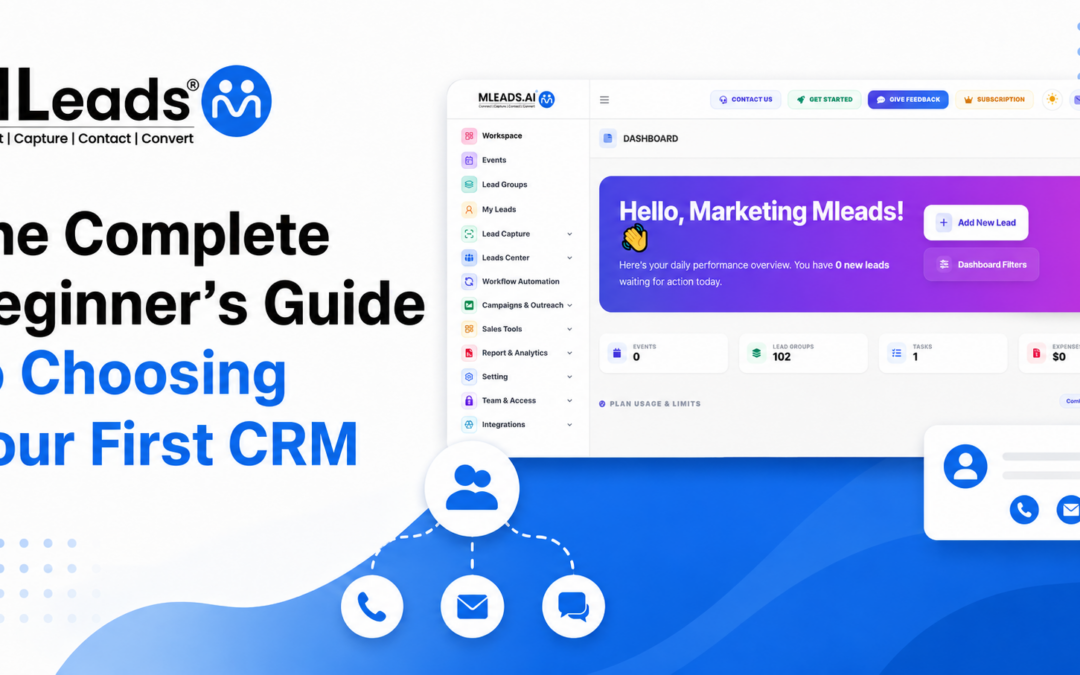
The Complete Beginner’s Guide to Choosing Your First CRM System
Choosing your first CRM system can feel confusing, especially when every platform claims to save time, increase sales, and organize your business overnight. Imagine a small business owner named Ravi. He meets prospects at events, receives inquiries from his website, collects business cards from networking meetings, and tracks follow-ups in a notebook. At first, it works. Then one warm lead is forgotten. Another prospect never gets a callback. A third asks for a quote, but the note is buried in a spreadsheet.
That is usually the moment a business realizes it does not just need more leads. It needs a better way to manage them.
A CRM is not only software. It is the place where customer relationships begin, grow, and turn into revenue.
The right tool helps you capture contacts, remember every conversation, schedule follow-ups, track sales activity, and understand what is working. The wrong tool creates another layer of confusion. This guide will help you understand what a CRM does, what features matter, how to compare options, and how to choose a platform your team will actually use.
What Is a CRM System?
A CRM system is a customer relationship management platform that helps businesses store, organize, track, and manage interactions with leads and customers. Instead of keeping contact details in phone notes, spreadsheets, email inboxes, and paper cards, everything sits in one connected place.
For beginners, the easiest way to understand CRM is to think of it as your sales memory. It remembers who your leads are, where they came from, what they asked for, who owns the follow-up, when the next action is due, and how close they are to becoming customers.
A simple CRM system can help a solo business owner stay organized. A more advanced platform can help a sales team assign leads, automate emails, manage meetings, track deal value, and analyze conversion reports. The goal is not to make sales more complicated. The goal is to make every lead easier to capture, understand, and convert.
Why Your First CRM Matters More Than You Think
Many businesses wait too long before choosing a CRM system. They tell themselves they will organize things later, once they have more leads or a bigger team. But this delay often creates hidden costs.
A lead who is not followed up on quickly may lose interest. A prospect who speaks with different team members may receive inconsistent information. A sales manager may know leads are coming in but have no clear way to see which campaigns, events, or team members are producing results.
Your first CRM becomes the foundation of your sales process. It shapes how your team captures information, how quickly you respond, how well you remember customer needs, and how confidently you make decisions. This is why the best CRM for a beginner is not always the biggest or most expensive platform. It is the one that fits your daily workflow and makes the next step easier.
Start With the Problem, Not the Software
Before comparing features, ask a simple question: what problem are we trying to fix?
Some businesses need help capturing leads from events. Others need a central place to track follow-ups. Some want email marketing automation. Others want reporting so they can see how many leads become customers. A business with field sales reps may care most about having a mobile CRM that works when the team is away from a desk.
Ravi did not need a complicated enterprise platform. He needed one place to scan business cards, store lead details, create follow-up tasks, and see which contacts were ready for a conversation. Once he understood the problem clearly, choosing became much easier. A CRM system should solve the pain you already feel. It should not force your business into a process that looks good in a demo but feels difficult in real life.
Understand the Core Features Every Beginner Needs
When you are new to CRM tools, feature lists can feel overwhelming. Some platforms offer hundreds of functions, but beginners usually need a few important things first.
1. Contact & Lead Management
The starting point. You should be able to add leads, update details, tag them by source or interest, and quickly find them again. Good search and filtering make a big difference as your database grows.
2. Follow-Up Management
The platform should help you schedule tasks, meetings, reminders, calls, emails, or messages so leads do not go cold. A CRM should make it clear what needs to happen today, not just store information for later.
3. Reporting
Even simple reports can show how many leads were captured, contacted, and moved forward, and where opportunities are getting stuck. A clean dashboard and quick lead entry often decide whether your team uses the platform daily or quietly returns to spreadsheets.
Why Mobile Access Is Now Essential
A few years ago, many CRM tools were built mainly for office teams. Today, leads are captured everywhere: at trade shows, conferences, client visits, real estate tours, medical events, business networking sessions, and quick coffee meetings. That is why a mobile CRM is no longer a nice extra. For many teams, it is the main way they work.
A mobile CRM lets you add leads while the conversation is still fresh. You can scan a business card, save a contact, add a note, schedule a task, or send a follow-up before leaving the event. This speed matters because the first response often shapes the prospect’s impression of your business.
Mobile access is especially useful for sales reps, event teams, consultants, agents, service providers, and small business owners who spend time outside the office. When your team can capture and act on lead information immediately, fewer opportunities slip away.
Look for Simple Lead Capture Options
Lead capture is where many sales processes begin to break. A business may collect plenty of contacts, but if those contacts are not saved properly, the pipeline becomes messy before the first follow-up even happens.
Your first CRM system should make lead capture quick and flexible. Manual typing is useful, but it should not be the only option. Look for tools that support practical capture methods such as business card scanning, QR code scanning, badge scanning, website forms, imports, or quick mobile entry.
For example, MLeads.AI is designed around mobile-first lead capture. It supports business card scanning, QR and badge-based capture, voice-based input, lead typing, nearby sharing, and other fast entry methods. This is useful for teams that meet leads at events or in the field and want to reduce manual work. The easier it is to capture a lead, the more likely your team is to do it correctly every time.
Do Not Ignore Follow-Ups
A lead is not valuable just because it is saved. It becomes valuable when someone follows up with the right message at the right time.
This is where a CRM system can quickly prove its worth. Instead of relying on memory, your team can create follow-up tasks, schedule meetings, send emails, add notes, and track what happened after each interaction. When follow-ups are visible, accountability improves. Everyone knows who is responsible and what needs to happen next.
For beginners, follow-up automation does not need to be complicated. Start with simple workflows: send a welcome email after a lead is captured, schedule a reminder two days later, and create a task for a sales call if the lead shows interest. Over time, you can build workflows based on lead source, product interest, or engagement level. The best CRM for your business should help your team move faster without making communication feel robotic.
Make Sure the CRM Supports Your Sales Process
Every business has a slightly different sales process. A real estate agent may track inquiries, property visits, and closing timelines. An insurance advisor may track policy interests and renewal dates. A B2B consultant may track discovery calls, proposals, negotiations, and signed contracts. An event organizer may track exhibitors, sponsors, attendees, and post-event outreach.
Your CRM should be flexible enough to match your process. It should let you categorize leads, group them by campaign or event, update lead status, record notes, and track next steps. A CRM system that works well for a beginner should also grow with the business. You may start with basic lead tracking today, then later add team assignments, sales opportunities, email campaigns, integrations, or reporting. Choosing a scalable option helps you avoid switching tools too soon.
Think About Team Collaboration Early
Even when a business starts with one person managing leads, collaboration often becomes important quickly. A new team member joins. A manager wants visibility. A sales rep needs access to event leads. A marketing person wants to see which campaigns are producing better contacts.
A good CRM system should make team collaboration simple. Look for features such as lead assignment, shared visibility, role-based access, team activity tracking, and group-based organization. These features help avoid confusion over who owns each lead.
Check Reporting Before You Need It
Many beginners think reporting is something they can worry about later. But even simple analytics can help from day one.
A mobile CRM with useful dashboards can help managers see what is happening without waiting for manual updates. For example, a sales manager can review how many leads came from an event, which leads were contacted, and which team members are moving opportunities forward. Reporting should not be difficult to understand. The best reports are clear enough for a beginner but detailed enough to support better decisions as the business grows.
Compare Ease of Use, Not Just Features
It is easy to be impressed by a long feature list. But a powerful tool is only useful if your team actually uses it.
When comparing CRM options, pay attention to the first experience. Can a new user understand the dashboard? Is adding a lead simple? Can they find contacts quickly? Is it easy to schedule a task or meeting? Does the app feel natural on mobile? Are support and onboarding resources available?
A CRM system with fewer but better-organized features may deliver more value than a crowded platform that requires weeks of training. For beginners, adoption is everything. The faster your team feels comfortable, the faster your data becomes useful. This is one reason small businesses often prefer tools that focus on practical workflows rather than enterprise-level complexity. The best CRM is the one that becomes part of the team’s daily routine.
Consider Integrations and Data Import
Your CRM will not exist alone. You may already use email, spreadsheets, phone contacts, marketing tools, calendars, or another platform where lead data currently lives. Before choosing, check how easy it is to bring that data into your new tool.
Imports can save many hours. Export options are also important because your business should always be able to access and use its own data. For beginners, do not chase every possible integration. Focus on the tools your team uses every week. A CRM that connects with your current workflow will feel easier to adopt and maintain.
Match the CRM to Your Business Size and Budget
Budget matters, but the cheapest option is not always the smartest choice. The real question is value: will this CRM help you save time, follow up faster, convert more leads, and understand your sales process better?
Look at pricing in relation to your team size, lead volume, required features, and growth plans. Some platforms are affordable at the start but become expensive as you add users or unlock important features. Others offer flexible plans that let small businesses start simple and upgrade later. A good CRM system should give you enough functionality to see results without forcing you to pay for features you are not ready to use. For SMBs, flexible pricing and scalability are important because your needs may change quickly.
Test the CRM With a Real Scenario
A demo is useful, but a real test is better. Before making a final decision, run a simple scenario from your actual business.
Try this: Create a lead → Add notes → Assign an owner → Schedule a follow-up → Send or prepare an email → Move the lead through your sales process → Check the dashboard → Search for the lead again → View a report.
Common Mistakes Beginners Should Avoid
Beginners often choose software only because it is popular, wait too long for a perfect tool, or ignore data quality after setup. A CRM works best when your team agrees on a simple process: capture complete details, add useful notes, assign ownership, and follow up consistently. Treat CRM as an action system, not just a storage folder.
Where MLeads Fits for First-Time CRM Users
For first-time users, MLeads.AI is a practical option because it is built around the daily problems many small businesses face: capturing leads quickly, organizing them clearly, following up on time, and tracking sales activity from mobile or desktop.
Its mobile-first approach is especially helpful for sales professionals, event organizers, field teams, consultants, and business owners who collect contacts outside the office. Features such as business card scanning, QR code capture, badge scanning, email templates, SMS and calling support, lead groups, team management, dashboards, reports, and AI-powered lead insights can help users move from scattered notes to a structured lead management process.
A mobile CRM like MLeads.AI can be useful when your team wants to capture leads at the source and act immediately. Instead of waiting until the end of the day to type contacts into a spreadsheet, users can save information, organize it, assign it, and begin follow-up while the conversation is still relevant.
How to Know You Are Ready for Your First CRM
You are ready for a CRM when leads are coming from more than one place. You are ready when follow-ups depend on memory. You are ready when you cannot quickly answer questions like “Who owns this lead?” or “How many event leads became meetings?” You are ready when spreadsheets are slowing the team down instead of helping them stay organized.
The decision does not need to be overwhelming. Start with your biggest problem. Choose a platform that solves that problem clearly. Test it with real leads. Keep your process simple. Train the team on the basics. Then improve step by step. A CRM system should help you create better habits: capture every lead, record useful context, follow up consistently, and learn from your results.
Final Thoughts: Choose a CRM Your Team Will Use
Choosing your first CRM system is not about finding the most complicated platform. It is about finding the tool that helps your business build stronger relationships from the first conversation onward.
The right CRM will make lead capture easier, follow-ups more reliable, sales tracking clearer, and customer engagement more consistent. It will help your team stop guessing and start working from one shared view of every opportunity.
For beginners, the best CRM is simple enough to use today and flexible enough to support tomorrow’s growth. And when mobile access, automation, reporting, and lead management come together, your business gets more than software. It gets a clearer path from first contact to paying customer.
Ready to Get Started?
Start capturing and converting leads with MLeads.AI
Scan, organize, follow up, and track every lead — from your phone or desktop. See how it works in a quick walkthrough.